
Streamline Link Blogging with Jekyll Integration
Overview
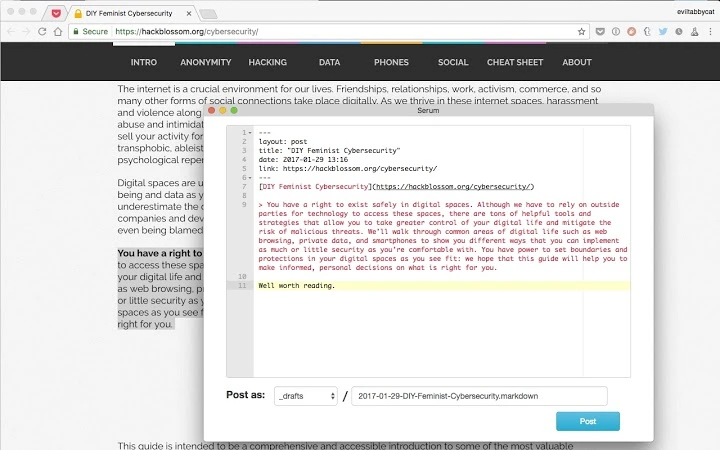
The software is designed to simplify the process of link blogging for users who maintain a Jekyll-powered blog hosted on GitHub. It functions as a browser extension that enables seamless content creation by allowing users to select text, trigger a toolbar action, and generate a new blog post file directly in their designated Jekyll directory. This tool is particularly useful for writers, developers, and content creators who frequently share insights from online sources and want to automate the initial step of post creation.
By reducing manual file creation and Markdown formatting, the software helps users focus on curation and commentary rather than technical setup. It is ideal for professionals and hobbyists managing personal blogs or team documentation sites built with Jekyll. The extension supports direct integration with GitHub-hosted repositories, ensuring that new posts are immediately available for review or publication after commit.
The developer did not provide additional background information. Real-world usage scenarios include summarizing articles, sharing curated resources, or documenting technical references with minimal friction. The tool operates entirely within the browser environment, making it accessible without complex installation procedures.
Key Features & Capabilities
- One-click post generation: Select any text on a webpage, click the extension button, and a new post file is created in your Jekyll blog directory.
- Direct GitHub integration: Posts are automatically added to the specified folder in your GitHub-hosted Jekyll repository.
- Markdown formatting support: The generated content includes proper Markdown syntax for headings, links, and blockquotes, reducing the need for manual editing.
- Customizable post template: Users can adjust the default structure of the new post file, including metadata like title, date, and tags.
- Minimal user input required: After selection, only basic edits are needed before saving and committing the file.
For example, a developer reading a technical article can highlight a key insight, activate the extension, and instantly create a structured post with a title and citation. This workflow is especially effective for maintaining a consistent content style across multiple entries. The tool eliminates repetitive tasks such as creating new files, adding YAML front matter, and formatting links—common steps in traditional Jekyll blogging.
User Interface, Workflow & Performance
The user interface is minimal and integrated into the browser toolbar, ensuring that the extension does not disrupt the browsing experience. Navigation is straightforward: select text, click the icon, and complete a lightweight editing form. The workflow is designed for speed and efficiency, with no additional windows or complex menus.
Performance is expected to be lightweight, given the extension’s focused purpose and small size (2.3 MB). The developer did not specify resource usage details. However, typical browser extensions of this nature consume minimal CPU and RAM during operation. Stability is likely maintained through consistent use of standard web APIs and a single-purpose design.
Since the tool operates locally within the browser and relies on GitHub’s file system for storage, it does not require constant internet connectivity after initial setup. The extension performs its core functions without relying on external servers, which contributes to predictable behavior and faster execution.
Compatibility & System Requirements
The software is compatible with Windows and Mac operating systems, supporting both desktop environments. It is designed to work as a browser extension, meaning it requires a modern web browser with extension support. The installation size is 2.3 MB, which is compact and suitable for quick deployment.
Exact system requirements were not listed. The developer did not specify hardware or software prerequisites beyond OS compatibility. Platform compatibility information is limited to the supported operating systems. Users should ensure their browser is up to date to maintain full functionality.
Pros and Cons
Pros
- Effortlessly creates Jekyll blog posts from selected text
- Seamless integration with GitHub-hosted Jekyll sites
- Minimal learning curve due to simple, intuitive interface
- Automates repetitive file creation and Markdown formatting
- Free to use with no licensing barriers
Cons
- No support for non-Jekyll blog platforms
- Dependent on browser and GitHub setup for full functionality
- Limited customization beyond basic post templates
- Requires manual commits to GitHub after file creation
- Not suitable for users unfamiliar with Markdown or Jekyll workflows
FAQ Section
Is this tool compatible with all web browsers?
The software is designed for browsers that support extensions, but specific browser compatibility was not provided. Users should check their browser’s extension marketplace for availability.
Does the extension require an internet connection?
While the extension functions offline after initial setup, an active internet connection is needed to access GitHub repositories and commit changes.
Can I use this tool with a non-GitHub blog?
No. The software is specifically built for GitHub-hosted Jekyll blogs and does not support other hosting platforms or CMS systems.
Is the software safe to install?
As a browser extension, it operates within the browser’s security model. Users should only install it from trusted sources and review its permissions before enabling.
How often are updates released?
The release date was May 15, 2024, and no update frequency was specified. Future updates may be released based on user feedback or feature requests.
Final Thoughts + CTA
This browser extension offers a streamlined solution for users maintaining a Jekyll blog on GitHub. Its ability to generate structured, ready-to-use posts with minimal input makes it a valuable asset for content creators who prioritize efficiency and consistency. While it serves a niche audience, its simplicity and zero cost make it highly accessible.
It is best suited for developers, technical writers, and bloggers familiar with Jekyll and Markdown. Those seeking a frictionless way to turn online insights into blog content will find this tool particularly effective.
Download the latest version today.







